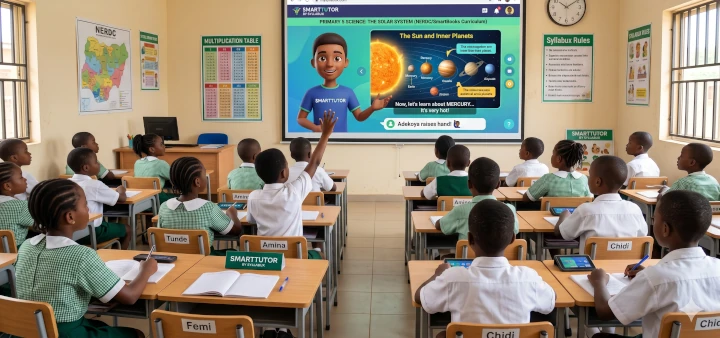
SmartTutor is an AI-powered offline classroom-focused tutor that delivers interactive lessons to students via TV or projector, guided by your school's timetable. Think of it as an assistant or substitute teacher that can teach a classroom, answer questions, and provide personalized feedback.
Optimized for large screens with teacher-style presentation flow
Designed for TVs, projectors, and smart boards. Every lesson is clearly visible to all students in the classroom.
Lessons follow the perfect teaching structure: introduction, explanation, examples, practice, and recap.
Supports text, images, diagrams, short animations, videos, and live AI-generated explanations.
Clear, classroom-appropriate pacing with voice narration for every lesson.
Lessons are automatically selected based on your school's timetable
Date, subject, class level, duration, and curriculum pre-configured by your school.
Automatically moves between subjects without any manual intervention.
Intelligently handles breaks, free periods, and revision slots.
Lessons are mapped to the official SmartBooks curriculum
Lessons are mapped to the official curriculum provided by SmartBooks (smartbooks.ng) for guaranteed syllabus coverage.
Supports NERDC, state and NAPPS schemes of work, weekly objectives, and lesson outcomes.
Prevents off-curriculum or inappropriate content from appearing in lessons.
Explains concepts in multiple ways and adapts to your class
Explains concepts in multiple ways—simple, detailed, with examples, animations, and simulations.
Adapts explanations based on class performance and engagement levels.
Can slow down, revise, or re-teach concepts automatically when needed.
SmartTutor can fully run a whole day's lessons without a human teacher present
Follows the timetable and teaches from start to finish without breaks.
Displays lesson notes, manages pacing, and asks questions during lessons.
Teacher shortage, absences, lesson standardisation, revision periods, or after-school sessions.
Optional add-ons for a more personalized experience
Students can ask questions verbally. SmartTutor personalizes responses based on class level and past questions.
Remembers questions previously asked, topics students struggle with, and concepts already mastered. Builds a lightweight learning profile per student.
Teachers and administrators can configure timetables, control lesson pacing in real-time, and choose from multiple teaching avatars to match their school's style.
Understanding what makes SmartTutor fundamentally different
Not an AI chatbot. SmartTutor is a structured, curriculum-aware, classroom-native teaching system — not a conversational chatbot.
Not an internet-based learning tool. It is offline-first. Once installed, lessons run entirely without the internet.
Not a disciplinarian or attendance tracker. Even in Substitute Teacher Mode, SmartTutor focuses purely on instructional delivery.
Not a student data collector. SmartTutor does not collect, transmit, or store any student data.
Addressing the most critical challenges in Nigerian classrooms
SmartTutor can run a full day's lessons entirely on its own — following the timetable, teaching, and managing pacing without a human teacher present.
Standardizes lesson delivery by strictly adhering to pre-loaded, officially aligned curriculums, ensuring every student receives the same high-quality education.
Unlike web-based platforms, SmartTutor is offline-first. Entire lessons run without internet — only student Q&A needs a brief connection.
Handles individual student questions without derailing the lesson, parking complex queries to revisit during recap or revision time.
Get your classroom running in minutes with these simple steps
Visit mysyllabux.com and download the SmartTutor App for your operating system (Windows, Linux, or Android).
Download the subjects you need — each subject is a zip file (also called a resource file). These contain all lesson content for offline use.
Install the SmartTutor app on your device and register with the license key you obtained from Syllabux. Internet is required for this one-time step.
On the start page, click "Install Resources", then select all the subject zip files you downloaded. SmartTutor will extract and prepare them.
Once resources are installed, SmartTutor works fully offline. Configure your timetable, connect to a TV or projector, and let the lessons begin.
Modest hardware requirements make SmartTutor accessible to any school
A TV, projector, or smart board for whole-class lesson presentation.
If your Large Display Screen does not running a compatible operating system, you will need a computing device. A modest device with at least 4GB RAM. Storage: 10GB–40GB per class depending on subjects installed.
A separate phone running the Smart Tutor Question App for students to submit real-time questions during lessons.
SmartTutor is designed for environments with limited or no internet
See why SmartTutor outperforms traditional and digital alternatives
| Feature | SmartTutor | Human Teachers | YouTube | Other EdTech |
|---|---|---|---|---|
| Works Offline | Yes | Yes | No | Rarely |
| Curriculum-Aligned | Strict | Varies | No | Varies |
| Interactive Q&A | Yes | Yes | No | Limited |
| Whole-Class Delivery | Yes | Yes | Passive | 1-on-1 |
| Automated Timetable | Yes | Manual | No | No |
| Content Safety | Strict | Varies | Open | Varies |
| No Student Data Collection | Yes | Yes | Tracks | Tracks |
| Can Substitute a Teacher | Full Day | N/A | No | No |
| Flat Pricing (not per-student) | Yes | Salary | Free | Per-student |
Flat pricing regardless of number of students or lessons delivered
No per-student cap. No extra installation fees when self-installed by the school. Contact Syllabux for a trial period.
Designed for Primary 1 to SSS3
The primary buyers. Standardize lessons across all classrooms at a flat institutional rate, regardless of student numbers. Ideal for schools with teacher shortages or high turnover.
Use SmartTutor as a reliable assistant. Teachers can pause, rewind, or skip explanations in real-time and provide their own input whenever they choose.
Enjoy engaging, interactive lessons with voice narration, rich media, instant feedback, and the ability to ask questions via the Smart Tutor Question App.
Everything you need to know about SmartTutor
Join schools across Nigeria already using SmartTutor to deliver consistent, high-quality education